
Chapter 8 : Data Types In Python
Data के type को Data Type कहा जाता है Python Programs Create करने मे Data Types महत्वपूर्ण भूमिका निभाते है | इस Chapter को add करने का Purpose आपको Data Types के बारे जानकारी देने से है | इस Chapter में आप Data Types , Advantages Of Data Types , Types Of Data Types , Numerical Data Types और भी महत्वपूर्ण Topics के बारे मे जानेगे | नीचे Complete Python Data Types chapter दिया गया है |
Data Types क्या है ?
Data Types Python मे बहुत महत्वपूर्ण भूमिका निभाते है | Variables मे Stored Data के Type को Data Types कहा जाता है | Data Types Python का आधार होते है | Python मे data का type बताने की जरूरत नही होती है | Python खुद से variable मे Stored value के type को पता कर लेता है | Python में Data Types को 6 वर्गों में बांटा गया है और हर data Type को समझना बहुत जरूरी है |
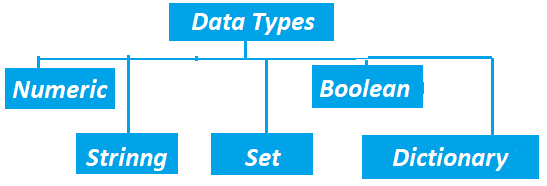
Numeric Data Types क्या होते हैं ?
Numeric Data Types Python का पहला Basic और समझने मे सरल Data Type है जिसका उपयोग variables मे Numeric values Store करने के लिए किया जाता है | 1, 2, 4, 6, -3,.4 etc. Numeric values होती है | Numeric Data Type तीन तरह का होता है |
1. Float = > Float Numeric Data Type का एक प्रकार है | जो decimals numbers को store करने के काम आता है | decimal numbers वो होते है | जो point(.) से शुरू होते है , जैसे :- .88, .33 etc. नीचे एक variable मे float value store करने का code दिया गया है |
1x = .6
2print(type(x))
<class 'float'> ></class>
Code Explanations
x = 6 = > x नाम का एक variable create किया गया है जिसमे .6 value stored है |
print(type(x)) = > ये print() function screen पर x variable के data type को show करता है |
2. Interger
Integer Numeric Data Type का एक प्रकार है | जो Integer numbers को store करने के काम आता है | ये Integer numbers Positive या negative हो सकते है | 3, 5, -8, -2 etc. Integer numbers है | नीचे एक variable मे Integer value store करने का code दिया गया है |
1x = 5
2print(type(x))
<class 'int'> ></class>
Code Explanation
x = 5 = > x नाम का एक variable create किया गया है , जिसमे 5 value store की गई है |
print(type(x)) = > ये print() function x variable के data type को show करता है |
3. Complex Complex numbers के 2 भाग होते है real और imaginary 5 + 4j एक complex number है | नीचे एक variable मे complex value store करने का code दिया गया है |
1x = 5 + 4j
2print(type(x))
<class 'complex'></class>
Code Explanations
x = 5 + 4j = > x नाम का एक variable create किया गया है , जिसमे एक complex(5 + 4j) value store की गई है
|
print(type(x)) = > ये print() function x variable को display करता है |
Boolean Data Type क्या होते है ?
Boolean एक ऐसा data type होता है जिसमे True या False Value store की जाती है | Boolean Data Type का अधिक उपयोग conditions को check करने के लिए किया जाता है जैसा Operator chapter मे किया गया था | उदाहरण के लिए ,
1a = 5
2b = 8
3print(a < b)
True
Code Explanations
a = 5 = > a एक variable है , जिसमे 5 value stored है |
b = 8 = > b एक variable है , जिसमे 8 value stored है |
print(a < b) = > ये print() function a b से छोटा है या नही result को show करता है |
Data Structure और Data Type दोनों कैसे ?
Data Type = > variable मे किस तरह का Data Stored है या Data के Type को Data Type कहा जाता है |
Data Structure = > Computer Memory मे Data को store , organize , access करने के तरीके को data
Structure कहते
है |
आपको बता दे की जो Data Type है वो Data Structure भी हो सकता है जैसे :
st = {1 , 3 , 5 , 2}
यदि आपसे पूछा जाए की उपर दिए गए code मे st variable मे किस तरह के data Structure का data stored है तो आपका जवाब होगा Set पर आपसे पूछा जाए की x variable का data type क्या है तो आपका जवाब होगा set तो इस तरह से एक data type data Structure और data Structure data type हो सकता है | नीचे कुछ data Types का वर्णन किया गया है जो data type के साथ - साथ Data Structure भी है |
Set Data Type क्या होता है ?
अगर Programmer को अपना Data Secure रखना हो तो Data को secure रखने के मामले मे Set एक बहुत महत्वपूर्ण और Intresting Data Type है वो ऐसे Set एक Mutable Data Type है और Mutable होते हुए भी Set मे कोई Duplicate data / value store नही की जा सकती है | Set को create करने के लिए {} curly braces का उपयोग किया जाता है , लेकिन इसमें key-value नहीं होते | नीचे दिए गए Code Editor मे एक Set create किया गया है |
1St = {2, 1, 5, 8}
2print(type(s))
<class 'set'>
Code Explanations
St = {2, 1, 5, 8} = > St नाम का एक Variables create किया गया है , जिसमे Set Data Stored है |
print(type(St)) = > ये print() function St variable का data Type Print करता है |
Set Operations
Python language मे Set पर Programming करने के लिए केवल Set को create करपाना काफी नही है | किसी Set पर Set को Delete करना , Set मे updation करना , Set Access करना Etc. Operations करने आने चाहिए | किसी Set को Delete करने के लिए , Set मे updation करने के लिए Set पर हर तरह के Operations करने के लिए अलग - अलग तरह के Functions Methods का उपयोग किया जाता है | किसी Set पर किए जाने वाले कुछ महत्वपूर्ण Operations का नीचे विस्तार मे वर्णन किया गया है |
Union Method
एक या एक से अधिक Sets को आपस मे मिलाकर एक Set create करना हो तब Union Method का उपयोग किया जाता है यानि की Sets मे एक से अधिक Common Values होने पर केवल एक value रखी जाती है और बाकी values remove कर दि जाती है | नीचे दिए गए code Editor मे दो sets create किए गए है और दोनों sets मे से common values मे से एक ही value print की गई है |
1A = {1, 2, 3}
2B = {3, 4, 5}
3print(A.union(B))
{1, 2, 3, 4, 5}
Code Explanation
A = {1, 2, 3} = > A नाम का एक variable create किया गया है , जिसमे set data store किया गया है |
B = {3, 4, 5} = > B नाम का एक variable create किया गया है , जिसमे set data store किया गया है |
print(A.union(B)) = > ये print() function A और B दोनों Variables से Common Data को display करता है |
Difference Method
Difference Method के उपयोग से एक या एक से अधिक sets के बीच Comparision किया जा सकता है यानि की जो values सब sets मे Common नही है उनका पता करने के लिए Difference Method का उपयोग किया जाता है | नीचे दिए गए Code Editor मे दो Sets create किए गए है और दोनों मे जो values common नही है print की गई है |
1A = {1, 2, 3}
2B = {3, 4, 5}
3print(A.difference(B))
{1, 2}
Code Explanation
A = {1, 2, 3} = > A नाम का एक variable create किया गया है , जिसमे set data store किया गया है |
B = {3, 4, 5} = > B नाम का एक variable create किया गया है , जिसमे set data store किया गया है |
print(A.difference(B)) = > ये print() function उन values को print करता जो values दोनों variables मे
नही है |
Subset
Subset Python language का एक ऐसा Method है , जिसका उपयोग किसी set के सभी values दूसरे Set मे है या नही पता करने के लिए Subset method का उपयोग किया जाता है | Subset Method के उपयोग से Output True या False मे मिलता है | नीचे दिए गए code Editor मे दो set create किए गए है और B set की Values A Set मे है या नही पता किया गया है |
1A = {1, 2}
2B = {1, 2, 3, 4}
3print(A.issubset(B))
True
Code Explanation
A = {1, 2} = > A variable मे set data store किया गया है |
B = {1, 2, 3, 4} = > B नाम का एक variable है , जिसमे कुछ Numbers store किए गए है |
print(A.issubset(B)) = > ये Print() function A variable मे stored सभी Numbers B variable मे मिल जाने
पर Output मे True show करता है |
4. String क्या होता है ?
String एक Immutable data Type है | यानि की create की गई string मे changes नही किए जा सकते है | Text को store करने के लिए String data Type का उपयोग किया जाता है | String को Single quotes , Double quotes या triple quotes मे create किया जा सकता है | String के साथ मे indexing , slicing etc. जैसे operations perform किए जा सकते है | NOTE : = > यदि आप को किसी variable मे text को store करना है | तो text को store करने के लिए केवल एक ही data type है | जिस data Type का नाम String , एक string को create करने का code निम्नलिखित दिया गया है |
1st = "Hello"
2print(type(st))
<class 'str'>
Code Explanations
st = "Hello" = > st एक variable है जिसमे text data को store करने के लिए String
data type का उपयोग किया गया है और String को Single quotes मे लिखा गया है |
print(type(st)) = > st variable मे stored value के type को पता करने के लिए type function का
उपयोग किया गया है |
1. string indexing (Method)
string indexing एक method है जिसके उपयोग से string के किसी index number पर कया text है को पता करने के लिए String indexing method का उपयोग किया जाता है | नीचे एक String indexing का example दिया गया है |
1st = "Hello"
2print(st[1])
e
Code Explanations
st = "Hello" = > st नाम का एक variable create किया गया है , जिसमे "Hello" value store की गई है |
print(st[1]) = > ये print() function st variable के index 1 पर stored element को print करता है |
2. String Slicing (Method)
String slicing string का एक महत्वपूर्ण method है जिसका उपयोग किसी एक starting index number से लेकर के किसी एक ending index number तक string मे store value को पता लगाने के लिए किया जाता है | जैसे :-
1st = "Hello"
2print(st[1 : 4])
ello
Code Explanations
st = "Hello" = > st नाम का एक variable create किया गया है , जिसमे "Hello" value store की गई है |
print(st[1 : 4]) = > ये print() function st variable के index 1 से index 4 पर stored elements को
print करता है |
String Concatenation (Method)
एक या एक से अधिक strings को आपस मे जोडने को String Concatenation (Method) कहा जाता है | बडे - बडे programs बनाते time string Concatenation method का उपयोग अधिक किया जाता है | नीचे string Concatenation का एक code लिखा गया है |
1st = "Hello "
2name = "user"
3print(st + name)
Hello user
Code Explanation
st = "Hello " = > st नाम का एक variable create किया गया है , जिसमे "Hello" value store की गई है |
name = "user" = > name st नाम का एक variable create किया गया है , जिसमे "user" value store की गई है |
print(st + name) = > ये print() function st variable और name variable को आपस मे add करता है |
Len()
Python मे String methods के साथ - साथ कुछ string functions भी होते है | len एक built in function है | जिसके उपयोग से string की lenght पता की जा सकती है | जैसे :-
1str = "Hello"
2print(len(str))
5
Code Explanation
stu = "Hello" = > stu नाम का एक variable create किया गया है , जिसमे "Kamal" name store किया गया है
|
print(len(str)) = > ये print() function str variable की lenght को show करता है |
Dictionary Data Type क्या होता है ?
Dictionary Python language का एक महत्वपूर्ण concept है , क्योंकि Dictionary का उपयोग Data को secure रखने के लिए किया जाता है | Dictionary एक Mutable Data Type है , जिसमे Data को key और value के pair मे store किया जाता है यानि create की गई keys की कोई ना कोई value जरूर होती है | Python language मे Dictionary को {} curly brackets मे लिखा जाता है | नीचे दिए गए Code Editor मे Dictionary के उपयोग से एक variable मे Student का data Store किया गया है |
1st = {
2    "Roll Number" : "1",
3    "Name" : "Shubham",
4    "Class" : "10th"
5}
6print(st)
{'Roll Number': '1', 'Name': 'Shubham', 'Class': '10th'}
Code Explanation
st = { = > st नाम का एक variable create किया गया , जिसमे Dictionary मे एक Student की informations
store की गई है |
print(st) = > ये print() function st variable मे stored Student की informations को show करता है |
Dictionary Operations
केवल Dictionary को create करना यानि Dictionary मे data store करना काफी नही है | Dictionary को access करना , Delete करना जैसे Dictionary पर काम करना आना चाहिए | बल्कि Dictionary पर delete , clear , add , updated etc. जैसे Operations Perform करने आने चाहिए | नीचे अधिक उपयोग किए जाने वाले Dictionary Methods का वर्णन किया गया है |
Value Access करना
जब हम एक Dictionary को create कर लेते है तो हमे Dictionary keys को access करने की जरूरत होती है | Python language मे Key से Values को access करपाना बहुत सरल है | Key से Value को access करने के लिए Python मे indexing या get() जैसे functions का उपयोग किया जाता है | नीचे दिए गए Code Editor मे एक Dictionary के value को key से access किया गया है |
1employee = {
2    "id" : "124"
3}
4print(employee["id"])
124
Code Explanation
employee = { = > employee नाम का एक variable create किया गया , जिसमे Dictionary मे एक employee से
संबंधित data store किया गया है |
print(employee["id"]) = > ये print() function screen पर employee table के id key के value को print
करता है |
Value Change करना
Dictionary Python language का एक Intresting Concept है , इसलिए ऐसा नही होता की एक बार Dictionary मे data को store करने के बाद stored data मे changes नही किए जा सकते है | Python language मे Dictionary के Values को change करने के लिए update method का उपयोग किया जाता है | नीचे दिए गए Code Editor मे एक Dictionary मे car की Information store की गई है और Update Method से car के Prise मे Changes किए गए है |
1car = {
2    "prise" : "10000"
3}
4car["prise"] = 20000
5print(car)
20000
Code Explanation
car = { = > car नाम का एक variable create किया गया है , जिसमे car की informations store
की गई है |
car["prise"] = 20000 = > car की prise value "20000" set की गई है |
print(car) = > ये print() function car variable को display करता है |
नई Key-Value जोड़ना
Dictionary एक Mutable Data Type है , इसलिए यदि एक बार Dictionary मे key और value store कर दिए जाए तो जरूरत पडने पर बाद मे नई Key और values add की जा सकती है | Dictionary मे नए Key - value add करने के लिए Update Method का उपयोग किया जाता है | नीचे दि गई Dictionary मे car का name add किया गया है |
1car = {
2    "prise" : "10000"
3}
4car["Name"] = "sssss"
5print(car)
{'prise': '10000', 'Name': 'sssss'}
Code Explanation
car = { = > car नाम का एक variable create किया गया है , जिसमे Dictionary मे car की informations store
की गई है |
car["Name"] = "sssss" = > car variable मे stored Dictionary मे "Name" और "sssss" नाम की नई Key value
add की गई है |
print(car) = > ये print() function car variable को display करता है |
Dictionary Delete करना
"del" Python language मे पहले से reserved Keyword है , जिसका उपयोग कोई Value , element को Delete करने के लिए किया जाता है | Python language मे Dictionary को या Dictionary के Key Values को Delete करने के लिए 'Del' Keyword का उपयोग किया जाता है | नीचे एक Dictionary के key value को Delete किया गया है |
1Student = {
2    "Roll Number" : "10"
3}
4del Student["Roll Number"]
5print(Roll Number)
{'prise': '10000', 'Name': 'sssss'}
Code Explanation
Student = { = > Student नाम का एक variable create किया गया है , जिसमे Dictionary मे एक Student की
information store
की गई है |
del Student["Roll Number"] = > Student Dictionary की "Roll Number" key और value को Delete किया गया है
|
print(Student) = > ये print() function Student variable को display करता है |
Mutable vs Immutable Data Types
| Base | Mutable | Immutable |
|---|---|---|
| 1. Definition | Mutable Data Types मे changes किए जा सकते है | | Immutable Data Types मे changes नही किए जा सकते है | |
| 2. Memory Address | Mutable Data Types का Memory Address Same रहता है | | Immutable Data Types का Memory Address change होते रहता है | |
| 3. Performance | Mutable Data Types की Performance थोडी slow होती है | | Immutable Data Types की Performance Mutable Data Types से fast होती है | |
| 4. Safety | Safety के मामले मे Mutable Data Types कम safe होते है | | Safety के मामले मे Imutable Data Types safe होते है | |
| 5. Examples | List , Dictionary , Set | Integer , String |
You have completed This Chapter ! 🎉
Now you can choose any one of the following options to test your knowledge :
Help Center
Users and we all help you together .