
Chapter 7 : Python Modules
यह Chapter Python Language का एक Interesting Chapter है जिसको Complete करने के बाद आप बडे Logics को छोटे Logics मे लिख पाएंगे | Modules Chapter का अधिक उपयोग mathematics calculations , game scores etc. को calculate करने के लिए किया जाता है | इस Chapter में आप Python Language के विभिन्न प्रकार के Modules जैसे Built-in Modules, Third-Party Modules और User-Defined Modules etc. के बारे में जानेगे |
Modules क्या होते है ?
Modules Python language मे बहुत महत्वपूर्ण भूमिका निभाते है | Python के अन्दर modules बनाई गई एक file होती है | इस File का नाम कुछ भी हो सकता है | इस file के अन्दर classes , functions , Methods etc. create किए जाते है | इस file मे बनाए गए functions , classes को एक अलग file मे import किया जा सकता है जैसे पिछले chapter मे आपने function create किए और वे function उसी file मे create किए जिस file मे आप programs लिख रहे थे | पर modules के उपयोग के से आप यही Functions किसी और file मे लिख करके और जिस file मे coding कर रहे है | उस file मे import कर सकते है | modules के उपयोग से बडे - बडे programs को लिखने मे आसानी होती है | और modules की file को .py की extension से save किया जाता है | module file मे बनाए गए function classes etc. को अलग file मे import करने के लिए import statement का उपयोग किया जाता है |
import statement क्या होती है ?
किसी एक file मे बनाए गए functions , classes variable etc. को किसी अलग File मे import करने के लिए import statement का उपयोग किया जाता है | एक file मे किसी दूसरी file को import करने के बहुत तरीके है | नीचे एक example.py नाम की file के functions को try.py मे import किया गया है |
| example.py | Try.py |
|---|---|
def sum(a, b): print(a+b) |
import example.py print(example.py.addition(10, 5)) |
Code Explanation
example.py
def sum(a, b): = > sum नाम का एक function create किया गया है a और b दो parameter pass
किए गए है |
print(a+b) = > ये print() function a और b variable की addition value को print करता है |
Try.py
import example.py = > Try.py mein example.py file को import किया गया है |
print(example.py.addition(10, 5)) = > ये print() function example.py के addition function
के उपयोग से output window पर 10 और 5 की addition value को print करता है |
1. Simple Import (Method)
किसी File के सभी functions , classes , variables etc. को import करने के लिए simple Import method का उपयोग किया जाता है | इस method से पूरी की पूरी file import की हो जाती है | simple import method मे सब कुछ file के नाम से access होता है जिससे की code clean होता है | जैसे :-
1import example
2sum = example.sum
3sum(5 ,2)
7
Code Explanation
import example = > example नाम की एक Python file import की गई है |
sum = example.sum = > example file के sum function का उपयोग किया गया है |
sum(5 , 2) = > sum function को 5 और 2 value दि गई है |
2. from … import … (Method)
किसी file से किसी special function , class variable etc. को import करने के लिए from import method का उपयोग किया जाता है | जैसे :-
1from example import sum
2sum(5, 20)
25
Code Explanation
from example import sum = > example file से केवल sum function को import किया गया है |
sum(5 , 20) = > sum() को 5 और 20 value दि गई है |
3. Alias (method)
आप चाहते है कि मे उस function का पूरा नाम न देकर short मे नाम दू | तो ऐसा करने के लिए Alias Method का उपयोग किया जाता है | जैसे :-
1from example import sum as s
2s(10, 30)
40
Code Explanation
from example import sum as s = > example file के sum function को s के नाम से import किया गया है |
s(10 , 30) = > sum function को 10 और 30 value दि गई है |
4. File Alias (Method)
जब file के नाम को भी short मे लिखना हो यानि alias बनाना हो तब File Alias Method का उपयोग किया जाता है | जैसे :-
1import example as ex
2ex.sum(5, 20)
25
Code Explanation
import example as ex = > example file को ex के नाम से import किया गया है |
ex.sum(5 , 20) = > example file के sum() function को 5 और 20 value दि गई है |
Features Of Import
1. Use = > import statement से कोई file , function , methods etc. किसी दूसरी file मे import किए
जा सकते है |
2. Keyword = > कुछ भी import करने के लिए import Keyword का उपयोग किया जाता है |
3. Code Reusability = > import के उपयोग से पहले से create किए गए functions , classes etc.
को Reuse किया जा सकता है |
4. Specific Function = > किसी पूरी module file को import करने की बजाए special Functions ,
Methods etc. को import किया जा सकता है |
5. Multiple Importing = > एक साथ एक से अधिक Modules files भी import की जा सकती है |
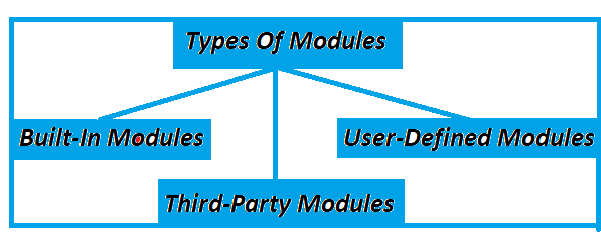
Types OF Modules
Python के अन्दर Modules को तीन भाग मे devide किया गया है |
Built-in-Modules क्या होते है ?
Python के अंदर बहुत सारे modules पहले से ही मौजूद होते हैं जिन्हें built-in modules कहा जाता है मतलब इन Modules को अलग से install करने की जरूरत नही होती है | कुछ Built-in-Modules के उदाहरण है :- os, sys, math, datetime etc. python| कुछ Built-in-Modules का नीचे वर्णन किया गया है |
1. Math Module
math module एक Built-In module है जिसका उपयोग mahtematical calculations के लिए किया जाता है | Square root , Power , Trigonometry etc. काम करने के लिए math module का उपयोग किया जाता है | math module मे कुछ functions है | जिनके जरिए ये काम किए जा सकते है |
1import math
2
3print(math.factorial(8))
40320
Code Explanation
import math = > math module file को import किया गया है |
print(math.factorial(8)) = > ये print() function 8 का factorial print करता है |
More Math Functions
| Function | Work | Code |
|---|---|---|
| 1. Power | x की घात y निकालता है | | print(math.pow(2, 3)) # 8.0 |
| 2. Factorial | संख्या का Factorial निकालता है | | print(math.factorial(5)) # 120 |
| 3. Ceil | ऊपर के ओर पूर्णांक देता है। | print(math.ceil(4.2)) # 5 |
| 4. Floor | नीचे के ओर Floor देता है | | print(math.floor(4.8)) # 4 |
| 5. Fabs | Absolute value देता है | | print(math.fabs(-7)) # 7.0 |
| 6. sqrt() | Square Root निकालता है | | print(math.sqrt(25)) |
Advantages Of Math Module
1. Creation = > Python मे Math Module एक Built In Module है , इसलिए हमे इस Module को create की जरूरत
नही है |
2. Time = > क्योंकि हमे factorial , Square root जैसे काम करने के लिए Program लिखने की जरूरत
नही है इसी कारण से हमारा Time बचता है |
3. Accurate Results = > क्योंकि Math Module पहले से Create किया गया है , इसलिए इसके उपयोग
से हमे सही Result मिलता है |
4. Math calculations = > Math Module का उपयोग mathematics calculations करने के लिए किया जाता
है |
5. installation = > Math Module Built In Module होने के कारण Math Module को अलग से
install करने की जरूरत नही है |
2. Random Module
Random Module का उपयोग कोई Random number generate करने , किसी list को shuffle करने etc. काम करने के लिए किया जाता है | यही नही games बनाने मे भी Random module का उपयोग किया जाता है | ये काम करने के लिए Random module मे भी कुछ functions होते है | जिनके जरिए ये काम किए जा सकते है |
1import random
2
3print(random.randint(10, 100))
74
Code Explanation
import random = > random module को import किया गया है |
print(random.randint(10, 100)) = > ये print() function 10 से 100 के बीच तक कोई एक number
print करता है |
More Random Functions
| Function | Work | Code |
|---|---|---|
| 1. uniform() | x और y के बीच की float value देता है | | print(random.uniform(1.5 , 5.5)) |
| 2. seed() | Random generator को fix करता है | | random.seed(10) print(random.random()) |
| 3. randint() | a से b के बीच कोई integer Number देता है | | print(random.randint(1, 6)) |
| 4. choice | दिए गए sequence से एक element देता है | | names = ["Ram", "Shyam", "Mohan"] print(random.choice(names)) |
| 5. shuffle() | stored values को shuffle करता है | | nums = [1,2,3,4,5] random.shuffle(nums) print(nums) |
3. Date Time Module
Days , Months , Year से related काम करने के लिए भी Python मे एक module है | जिसका नाम Date Time Module है | इस module का उपयोग करके current time से related projects पर काम किया जाता है | नीचे Date Time Module का एक code दिया गया है जो Short मे Month Name को print करता है |
1import datetime
2
3q = datetime.datetime.now()
4n = q.strftime("%b")
5print(n)
Nov
Code Explanation
import datetime = > datetime module को import किया गया है |
q = datetime.datetime.now() = > q नाम का variable create किया गया है , जिसमे Live data Stored है
|
n = q.strftime("%b") = > q variable से n variable मे केवल Month Name को store किया गया है |
print(n) = > ये print() function n variable को display करता है |
More DateTime Functions
| Function | Work | Code |
|---|---|---|
| 1. %B | Full Month name के लिए उपयोग किया जाता है | | print(now.strftime("%B")) |
| 2. %m | Month Names को Numbers मे उपयोग करने के लिए उपयोग किया जाता है | | print(now.strftime("%m")) |
| 3. %y | Year के last के दो Numbers के लिए उपयोग किया जाता है | | print(now.strftime("%y")) |
| 4. %Y | Year के Name को Full Numbers के लिए उपयोग किया जाता है | | \print(now.strftime("%Y")) |
| 5. %T | current Time को पता करने के लिए %T का उपयोग किया जाता है | | print(now.strftime("%H:%M:%S")) |
Features Of Date Time Module
1. Time Zone Support = > Date Time Module Country के अनुसार काम करता है |
2. Logining = > websites , Apps etc. मे Login , Sign In system create मे बहुत उपयोगी है |
3. Controling = > Date Time Module मे Date Time दोनों को Handle किया जा सकता है |
4. Weekday = > Weekday पता किए जा सकते है |
User-defined Module क्या होते है ?
user defin modules वे modules होते है जिनको user अपने काम को सरल बनाने हेतु create करता है | यानि इन modules को user के द्वारा बनाया जाता है | ये module python की एक file होती है जिसके अन्दर user functions , classes , varriables etc. create करता है और इस file से इन functions varriables classes etc. को किसी और file के अन्दर import करता है |
User-Defined Module बनाने के steps
step 1 :example.py नाम की एक File बनाओ |
step 2 :example.py मे एक function बनाए जैसे :-
  # example.py
1def sum(a , b)
2   print(a + b)
step 3 : अब एक try.py नाम की file बनाए |
step 4 : अब try.py मे sum function के use का code लिखे |
  # try.py
1import example
2sum = example.sum
3sum(5 ,2)
इस तरह से आप User-Defined Modules का उपयोग कर सकते है |
Simple User Defined Module
| example.py | try.py |
|---|---|
def addition(a, b):
    return a + b
|
import example.py print(example.py.addition(10, 5)) |
Code Explanation
def addition(a, b): = > addition नाम का एक Function create किया गया है |
return a + b = > addition function a और b variable की addition value को return करता है |
import example.py = > example.py file को import किया गया है |
print(example.py.addition(10, 5)) = > ये print() function example file के addition से 10 और
5 की addition value display करता है |
User-Defined Modules के लाभ
1. Reusability
modules का तो खास उपयोग इसलिए किया जाता है कि किसी code को बार - बार repeat ना करना पडे |
मतलब modules के उपयोग से एक ही कोड बार-बार उपयोग कर सकते हैं |
3. Time Saving
कोई code को बार - बार repeat न करने के कारण time की बचत होती है |
4. speed
Modules के उपयोग से user की code लिखने और समझने मे speed बडती है |
5. Team Work Friendly
अलग-अलग लोग अपने code के अनुसार अलग - अलग modules बना सकते हैं |
3. Third-Party Modules
ये वे modules होते है | जो न तो python के साथ में पहले से install हुए आते है | और न ही user के द्वारा बनाया जाते है | बल्कि ये modules किसी बाहरी organization या किसी बाहरी developer के द्वारा बनाऐ जाते है | इसलिए इन modules का use करने के लिए इन्हें अलग से install करना होता है | इन modules को install करने के लिए pip command का use किया जाता है |
For Example
1pip install module-name
2# For Example
3pip install emoji
Code Explanation
pip install module-name = > कोई Module install करने के लिए pip command का उपयोग किया जाता है |
# For Example = > ये एक Comment है |
pip install emoji = > इस command को terminal मे run करने से emoji module file install होती है |
How To Use Of emoji module
1import emoji
2print(emoji.emojize("I love python : snake:"))
Code Explanation
import emoji = > emoji नाम की module file को import किया गया है |
print(emoji.emojize("I love python : snake:")) = > ये print() function दिए गए message के last
मे snake emoji को print करता है |
advantages of Third-Party Modules
1. TIme Saving इन modules को user नही बनाता , इसलिए user के time बचत होती है |
user इनको install करके use कर सकता है |
2. Performance Because ये Modules बाहरी organization से बनाए जाते है |
और इनको c , c++ जैसी languages मे बनाया जाता है , इसलिए इन Modules की Performance बहुत तेज होती है |
3. New Features Third-Party Modules मे features updates add time to time add किए जाते
रहते है |
4.Extendable Projects आप आपने projects के अनुसार Third-Party Modules को modify
कर सकते है |
5. Complex Projects Third-Party Modules बडे projects पर काम करने के लिए helpful होते है
|
Third-Party modules की आवश्यकता क्यों होती है ?
built-in modules और एक शुरूआती programmer की कुछ limits होती है | इसलिए Third-Party modules
की आवश्यकता होती है | नीचे Third-Party modules की आवश्यकताओ का वर्णन किया गया है |
1. Python Built-In Modules limits Python मे Built-In Moduls की कुछ limits होती है |
जैसे :-
की built-in modules सामान्य काम कर सकते हैं |
2. Speed user की speed मे growth करने के लिए |
3. Technology Features अब के समय मे हर दिन कोई न कोई नया feature आता है |
इसलिए built-in modules मे हर दिन नए features add नही किए जाते |
4. Interest कुछ programmers की Modules बनाने मे रूचि नही होती है , इसलिए
वो programmers modules को install करके काम करते है |
5. No Knowledge कुछ begginers programmers अपने projects के अनुसार functions classes
create नही कर पाते इसलिए वो Third-Party Modules को install कर लेते है |
Diffrence Bitween Third Party , User-Defined And Built-In Modules
| Base | Built In | User Defined | Third Party Modules |
|---|---|---|---|
| 1. Creation | Python developers के दवारा बनाए जाते है | | User के दवारा बनाए जाते है | | External Developer के दवारा बनाए जाते है | |
| 2. Uses | Basic काम को करने के लिए उपयोग किए जाते है | | Advanced काम को करने के लिए उपयोग किए जाते है | | Custom काम को करने के लिए उपयोग किए जाते है | |
| 3. installation | Built In Modules को install नही किया जाता है | | User Defined Modules को user खुद से Create करता है | | Third Party Modules का उपयोग करने के लिए इनको अलग से install किया जाता है | |
| 4. Speed | Built In Modules की Speed fast होती है | | User Defined Modules के Speed User पर Based है | | Third Party Modules की Speed भी fast होती है | |
| 5. Example | Math , Random | Mymodule.py | numpy , emoji |
You have completed This Chapter ! 🎉
Now you can choose any one of the following options to test your knowledge :
Help Center
Users and we all help you together .