
Chapter 4 : Control Flow Statements In Python
Python Language मे Programs को अपने अनुसार काम कराने के लिए Python language का एक महत्वपूर्ण chapter control Flow है | कब कौन - सा Program Run हो , कब क्या हो , कोई Program कब तक चले आदि निर्णय लेने के लिए Programming Languages मे Control Flow Statements का उपयोग किया जाता है | इस chapter मे आप Conditional Statements , Loopping Statements जैसे और महत्वपूर्ण Concepts के बारे मे जानेगे | Chapter के Main Logics को समझने के लिए Site पर Available Practice Sets (Problems) को Solve करना न भूले |
Control Flow क्या है ?
Control Flow से मतलब है कि लिखे जा रहे Program का Flow कैसा होगा वो काम कैसे करेगा | Control flow वे statements होती है जिनके उपयोग से लिखे गए Program को control किया जाता है | किसी Program के अंदर कब कौन-सा code चलेगा , कब तक चलेगा , कहाँ से चलेगा आदि निर्णय लेने के लिए Control Flow Statements का उपयोग किया जाता है | जैसे : जिस व्यक्ति की age 18 के बराबर है या 18 से बडी है वो vote कर सकता है लेकिन जिस व्यक्ति की age 18 से कम है वो vote नही कर सकता है | कुछ इस तरह से Programs को Control करने के लिए Contrl Flow Statements का उपयोग किया जाता है | control flow statements को control Structure के नाम से भी जाना जाता है | control flow statements को मुख्य रूप से तीन Parts मे Devide किया गया है |
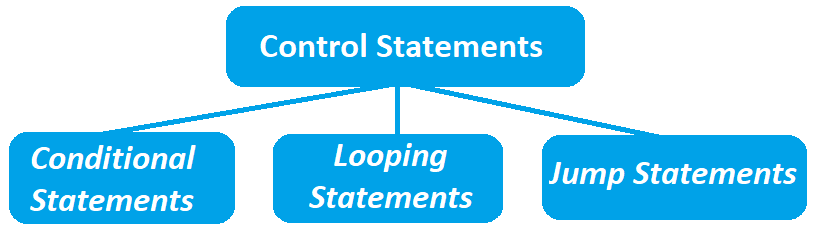
1. Conditional Statements
Conditional Statements control flow का एक अहम भाग है | conditional statements वे statements होती है जिनमें conditions के आधार पर decisions लिए जाते है | मतलब अगर कोई condition true होती है | तो कुछ काम होगा, नहीं तो कोई दूसरा काम होगा | सरल शब्दो मे अगर एक condition गलत होती है तो दूसरी condition काम करती है अगर दूसरी condition गलत होती है तब तीसरी condition काम करती है | उदाहरण के लिए , student के marks 89 से उपर आने पर 1st Prise 79 से उपर marks आने पर 2nd prise Python Language मे Conditional Statements को निम्नलिखित तीन Parts मे devide किया गया है |
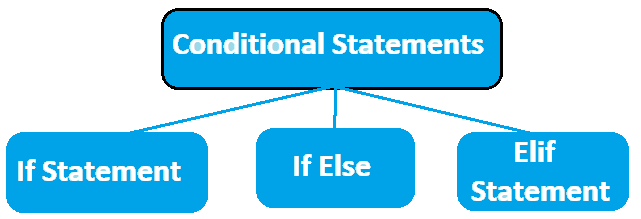
1. If Statement conditional statements की सबसे पहली और Basic statement है | If statement का उपयोग करना बहुत सरल है | अगर condition True होती है तो If statement चलती है और अगर condition false होती है तो If statement अपना काम नही करती है | नीचे If Statement का एक Python Code दिया गया है |
1age = 18
2if age <= 18 :
3    print("you can vote")
you can vote
Code Explanation
age = 18 = > age एक variable का नाम है जिसमे 18 value store की गई है |
if age <= 18 : = > age variable मे stored value 18 से कम होने पर ये if statement true होती है |
print("you can vote") = > if statement के true होने पर ये print() function screen पर
"you can vote" message show करता है |
If else
If else statement तब काम करती है जब इससे उपर वाली statement True नही होती है यानि false हो जाती है | if else statement को else statement भी कहा जाता है | नीचे else statement का एक Code दिया गया है |
1age = 28
2if age >= 18 :
3   print("you can vote")
4else:
5   print("you can not vote")
you can not vote
Code Explanation
age = 28 = > age एक variable है जिसमे 28 value store की गई है |
if age <= 18 = > age variable मे stored value के 18 से बडी होने पर या 18 के Equal होने पर ये
if statement True होती है |
print() = > if statement के true होने पर ये print() function screen पर "you can Vote" message
show करता है |
else: = > If Statement के False होने के बाद ये else block run होगा |
print("you can not vote") = > else के True होने पर ये print() function screen पर "you can not vote"
message show करता है |
If-Elif-Else
If Elif Else statement भी तभी चलती है जब इससे उपर वाली statements false हो जाती है | एक से ज़्यादा शर्तें होंने पर elif Statement का उपयोग किया जाता है | If Elif Else statement को elif से defin किया जाता है | नीचे elif statement का code दिया गया है |
1marks = 40
2if marks > 89:
3   print("grade A :")
4elif marks > 79:
5   print("grade B :")
6elif marks > 39:
7   print("grade C :")
8else :
9   print("grade D :")
grade C :
Code Explanation
marks = 40 = > marks नाम का एक variable create किया गया है जिसमे 40 value store की गई है |
if marks > 89 = > marks variable मे stored marks 89 से अधिक होने पर ये if statement True होती
है |
print("grade A :") = > if statement के True होने पर ये print() function screen पर "grade A :"
show करता है |
elif marks > 79 : = > marks variable मे stored marks 79 से अधिक होने पर ये elif statement True
होती है |
print("grade B :") = > elif statement के true होने पर ये print() function screen पर "grade B :"
show करता है |
else : = > else के उपर दि गई सभी Statements के false होने के बाद ये else statement True
होती है |
print("grade D :") = > else के true होने पर ये print() function screen पर "grade D :" message
show करता है |
Nested If
Nested If का मतलब है | कि एक if condition के अन्दर एक और If condition का उपयोग करना यानि की एक condition के अन्दर दूसरी condition check करने के लिए Nested If का उपयोग किया जाता है | नीचे Nested if का code दिया गया है |
1age = 18
2resident = True
3if age >= 18:
4    if resident:
5        print("you can vote")
you can vote
code Explanation
age = 18 : age नाम का एक variable है जिसमे 18 value store है |
resident = True : resident नाम का एक variable create किया गया है जिसमे
True Value store की गई है |
if age >= 18: : age variable मे stored value 18 के बराबर या 18 से बडी होने पर
ये if statement True होगी |
if resident: : resident variable मे True value store होने पर ये if statement True होती
है |
print("you can vote") : सभी if statement True होने पर ये print() screen पर
"you can vote" message show करता है |
2. Loopping Statements
Loops Python language का एक बहुत महत्वपूर्ण Topic है क्योंकि loops के उपयोग से auto Games Score increase , countings जैसे काम किए जा सकते है | किसी code को बार-बार दोहराने (repeat) के लिए loops का उपयोग किया जाता है | जैसे => 1 से लेकर 200 तक के numbers को print करना यहा केवल Number मे 1 का increment किया जा रहा है बाकी काम same है , इसलिए इस Task को Loop के उपयोग से आसानी से पूरा किया जा सकता है | Python language में loops दो प्रकार के होते हैं : For loop और While Loop
1.For Loop
Python Language मे Program लिखते Time सबसे अधिक उपयोग For Loop का ही किया जाता है क्योंकि For loop का Syntax सरल है जिसके कारण इसका उपयोग करपाना भी सरल है | दि गई condition पता होने पर For Loop का उपयोग किया जाता है यानि की loop को कब तक चलाना है ये clear होने पर For Loop का उपयोग किया जाता है जैसे : 1 से 10 के Numbers को Print करना | For loop के अंदर fixed repeatation होता है | यानि की for loop एक sequence मे काम करता है , इसलिए for loop का उपयोग करना बहुत सरल है | Python language मे for loop का Syntax कुछ ऐसा होता है |
1 for variable in sequence
2      #code
Syntax Explanation
for : for loop का उपयोग करने के लिए for keyword का उपयोग किया जाता है |
variable : value को store करने के लिए एक variable का उपयोग किया जाता है |
in :> variable मे value store करने के लिए in keyword का उपयोग किया जाता है |
sequence : Loop को किस Direction मे चलाना है यानि कहा से कहा तक
code : for Loop को define करने के बाद Codes / programs लिखे जाते है |
नीचे 1 से 5 तक के Numbers को Print करने के लिए एक For Loop का उपयोग किया गया है |
1for a in range(1 , 5):
2   print(a)
1
2
3
4
5
Code Explanation
for a in range (1, 5) : ये for loop 1 से 5 तक के Numbers को एक - एक करके a variable मे store
करता है |
print(a) : ये Print() function a variable मे stored numbers को display करता है |
2.While Loop
while Loop For loop के विपरीत काम करता है यानि की जब यह नही पता होती की for loop कहा से start हो और कहा पर खतम हो तो While Loop का उपयोग किया जाता है | while loop के अंदर condition based repeatation होता है | यानि कि जब तक while loop मे दी गई condition True होती तब तक while loop चलता रहता है और दि गई Condition के False होते ही Loop रूक जाता है | जैसे : User 1 के Points user 2 से उपर जाते ही User 1 win का जीत जाना यहा हमे नही पता की user 1 के कितने Points है Point पता होते तो For loop का उपयोग किया जाता | Python language मे While loop का Syntax कुछ ऐसा होता है |
     while condition :
            # code
While = > While loop का उपयोग करने के लिए while keyword का उपयोग किया जाता है |
condition = > while loop को चलाने के लिए Condition set करनी होती है |
नीचे While Loop का एक Code दिया गया है जो 5 तक के Numbers को print करता है |
1count = 1
2while count <=5:
3   print(count)
4   count += 1
1
2
3
4
5
Code Explanation
count = 1 = > count एक variable है जिसमे 1 value store की गई है |
while count < =5 = > जब तक count variable मे stored number 5 से छोटा या 5 के Equal नही होगा
तक ये While loop चलेगा |
print(count) = > ये print() function count variable मे stored numbers को show करता है |
count += 1 = > ये statement count variable मे stored Number मे 1 का increment करती है |
Diffrence Bitween For And While Loop
| For Loop | While Loop |
|---|---|
| For Loop मे Fixed repeatation होता है | | While Loop मे Condition Based repeatation होता है | |
| For Loop के लिए for Keyword का उपयोग किया जाता है | | While Loop के लिए While Keyword का उपयोग किया जाता है | |
| For Loop मे Start Point और End Point होता है | | While Loop मे Condition set होती है | |
| For Loop मे in Keyword का उपयोग किया जाता है | | While Loop मे + Operators का उपयोग किया जाता है | |
| उपयोग करने मे सरल है | | उपयोग करने मे कठिन है | |
3. Loop Control Statements
जैसा की पहले ही बताया गया है कि Control Flow Statements का उपयोग Programs को control करने के लिए
किया जाता है , इसलिए Python मे केवल Loop का उपयोग करना आना काफी नही है , बल्कि बनाए गए
Loop को control करना आना भी चाहिए | Python Language मे Loops को Control करने के लिए Loop Control
Statements का उपयोग किया जाता है | Loop Control Statements वे statements होती है जो ये तय करती है कि कोई loop
कब चलेगा, कब रुकेगा या कब खतम होगा Loop Control Statements तीन तरह की होती है |
1. Continue Statement
2. Pass Statement
3. Break Statement
1. Continue Statement
Continue Statement Loop Control Statements की सबसे पहली और Basic Statement है जिसका उपयोग करना और Logic समझना सरल है | Current iteration को skip करने के लिए Continue Statement का उपयोग किया जाता है | Continue Statement के उपयोग का नीचे एक Code दिया गया है |
1for n in range(1, 5):
2   if n == 3:
3   continue
4   print(n)
1
2
4
5
Code Explanation
for n in range(1, 5): = > ये for loop 1 से 5 तक के Numbers को एक - एक करके n variable मे store करता है |
if n == 3 : = > n variable मे Stored Number के 3 के बराबर होते ही ये if Statement True होगी |
continue = > 3 को skip करके loop आगे चले |
print(n) = > ये print() function n variable मे stored numbers को show करता है |
2. Pass Statement
किसी Temporary code को खाली रखने के लिए pass statement का उपयोग किया जाता है | सरल शब्दो मे, कुछ नहीं करता, बस placeholder की तरह होता है | Pass statement के उपयोग का एक code नीचे दिया गया है |
1#  1st Program :
2for k in range(1, 10):
3#  2nd Program :
4for k in range(1, 10):
5   pass
Code Explanation
1st Program पूरा न लिखे जाने के कारण Python Error देगा लेकिन 2nd Progam को run करने पर कोई error नही आएगा |
3.Break
किसी loop को control करने के लिए Break statement का बहुत उपयोग किया जाता है |
Break statement एक ऐसी statement है जो loop को रोकने के काम आती है |
सरल शब्दो मे , loop को किसी code या किसी condition पर रोकने के लिए break Statement का उपयोग किया जाता है |
नीचे Break Statement के उपयोग का एक code दिया गया है जो 10 तक के Numbers को print करता है लेकिन 5 पर
रूक जाता है |
1for i in range(10):
2    if i == 5:
3        break
    0
    1
    2
    3
    4
Code Explanation
for i in range(10): = > ये For Loop पहले एक एक 10 Numbers को i variable मे store करता है |
if i == 9: = > i variable मे Stored number के 9 के बराबर होने पर ये if statement
True होती है |
break = > if statement के True होते ही loop stop हो जाता है |
Diffrence Between Pass , Break And Continue
| Pass | break | continue |
|---|---|---|
| Code को खाली रखने के लिए उपयोग किया जाता है | | loop को रोकने के लिए उपयोग किया जाता है | | Current iteration को skip करने के लिए उपयोग किया जाता है | |
| Pass को उपयोग करने के लिए pass keyword का उपयोग किया जाता है | | Break को उपयोग करने के लिए break keyword का उपयोग किया जाता है | | Continue को उपयोग करने के लिए continue keyword का उपयोग किया जाता है | |
| pass को समझना confusing है | | break को समझना सरल है | | continue अधिक Condition Based है | |
You have completed This Chapter ! 🎉
Now you can choose any one of the following options to test your knowledge :
Help Center
Users and we all help you together .